
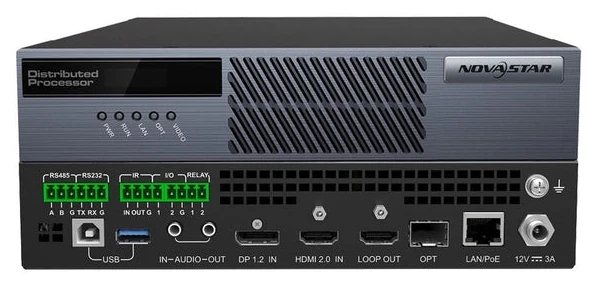
What is the NovaStar MG420?
If the computer you need on screen sits in another room, or another floor, a video cable is the wrong tool — and the NovaStar MG420 is what replaces it. It is an AV over IP encoder: it takes that computer’s picture and puts it on your ordinary Gigabit network, so any screen on that network can show it.
You plug your source into the MG420 on DP 1.2 or HDMI 2.0. It compresses what it sees into an H.264 or H.265 stream and sends that out of a single network port. At the far end an MG421 turns the stream back into a picture on a monitor, or an MGT1000 puts it straight onto an LED wall.
You get more than the picture. The MG420 takes 4K at 60 Hz, carries your source’s audio with the video, and, using the supplied USB cable, hands you mouse and keyboard control of that machine as well. A LOOP OUT socket feeds a monitor beside the rack, and a fiber port covers runs too long for copper.
The point of doing it this way is that you stop running video cable. You no longer need a cable per screen, or a matrix switcher sized for the whole building, and you add a source by plugging in one more encoder and giving it an IP address.
You do not pay for that in lag. NovaStar rates the trip from encoder to decoder at 60 ms or less, which is quick enough to drive a remote PC by mouse.
MG420 key features
Encoding quality set per source
With one quality setting for everything, you tune the system for your hardest source and every other source pays for it. Each MG420 carries its own encoding settings instead, so you set the camera feed and the dashboard separately.
You choose Smooth to protect motion, Clear to protect detail, or Custom to set it yourself. Custom gives you five controls:
- H.264 or H.265
- Constant, variable or low-latency bitrate
- Quantization value from 5 to 51
- 8-bit or 10-bit output
- Full or half refresh rate
So you can put a moving camera on low latency and leave a static dashboard on a lower bitrate, and neither one takes the bandwidth the other needs.
KVM control over the same cable
Run the supplied USB cable from the MG420 to your source computer and that stream stops being video only. You get mouse, keyboard and remote power for the machine, from wherever the decoder is.
That is what lets you move the computers out. Put your PCs in the machine room, keep your operators at clean desks, and stop walking downstairs to click something.
Skip the cable and you still get the picture, just not the control. Your operator screen marks that with its own icon, so you can see at a glance which sources you can drive.
Locked input EDID
You have probably had a PC come back from a reboot at 1024×768 and shrink its own window on the wall. The MG420 tells your source what to output instead of asking it, so that stops happening.
Set a standard timing, or a custom size from 800 to 8192 wide and 600 to 7680 high, then export that setting and import it onto your other encoders. Twelve consoles come up the same way every time, and you never touch twelve machines to do it.
LOOP OUT for a local monitor
When a position goes dark, the first thing you need to know is whether you lost the source or the network. LOOP OUT gives you that answer at the rack.
It passes the incoming picture straight to a second connector, before any compression, so plug a monitor in and look. A picture there means your source is fine and the fault is downstream. Nothing there means the source itself.
How many MG420 encoders do you need?
One for every display output you need to see elsewhere, which is not the same as one per computer.
Your MG420 has both a DP 1.2 and an HDMI 2.0 socket, but only one of them works at a time. So a single-screen PC costs you one encoder, a dual-screen operator PC costs two, and a four-screen video wall controller costs four.
Buying two for one PC does not leave you with two unrelated pictures. Group them as a Mosaic Source in the web interface, set the rows and columns to match the graphics card, and your halves join back up on screen.
Your cameras cost you nothing here. IP cameras speaking ONVIF or RTSP join the system directly with no encoder in front of them, so sixteen cameras and two consoles need two MG420s, not eighteen.
Order one MG420 per active display output. Order none for network cameras.
MG420 specifications
These figures answer three things before you order: what your source can be, how you will power it, and whether it fits your rack.
| Role | AV over IP encoder |
|---|---|
| Video inputs | 1× DP 1.2 (HDCP 1.3), 1× HDMI 2.0 (HDCP 1.4 and 2.2) — one active at a time |
| Maximum input | 4096×2160@60Hz |
| Bit depth and sampling | 8-bit: 4096×2160@60Hz in RGB 4:4:4. 10-bit: 4096×2160@60Hz at 4:2:2, or 4096×2160@30Hz at 4:4:4 |
| Input EDID range | Width 800 to 8192 pixels, height 600 to 7680 pixels |
| Encoding | H.264 or H.265, constant, variable or low-latency bitrate |
| Loop through | 1× LOOP OUT carrying the selected DP 1.2 or HDMI 2.0 input |
| Audio | 1× 3.5 mm in, 1× 3.5 mm out, two channels to 48 kHz and 16-bit |
| Network | 1× Gigabit LAN with PoE 802.3AT, Cat5e or better |
| Optical | 1× 1G OPT port taking 1.25G modules, usable as the LAN backup |
| USB | 1× Type-B USB 2.0 to the source computer, 1× Type-A USB 3.0 reserved |
| Control | 1× RS485 and 1× RS232, IR in and out, 2× I/O at 3.3 V, 1× relay rated 30 V DC and 3 A |
| Power | DC 12V 3A adapter, PoE 802.3AT, or both together |
| Maximum draw | 20 W |
| Dimensions | 211.7 mm × 226.0 mm × 45.0 mm |
| Weight | 1.9 kg net, 2.9 kg gross |
| Operating range | −10 °C to +60 °C, 0% to 80% RH non-condensing |
| Certifications | CCC, CE, FCC Class A |
One row is worth a second look, because it is a ladder rather than a headline. You get full RGB 4:4:4 at 4096×2160 and 60 Hz only at 8-bit. Ask for 10 bits at that size and speed and you drop to 4:2:2 sampling, and hold 4:4:4 at 10 bits and you drop to 30 Hz.
So if your job specifies 10-bit 4:4:4 at 60 Hz, this input will not meet it. Settle that before the drawings are signed.
What else you need to build the system
Three things sit between your MG420 and a picture at the far end.
A decoder to run the system
One thing to get right before you order: an MG420 on its own is not a system. Only a decoder can be the primary management node, and that node holds the web interface you configure everything from.
You open a browser at its IP address and log in, and encoders you add later appear in the device list on their own. Firmware goes out from the same page, so you update thirty encoders at once without opening a rack.
So your minimum order is one MG420 plus one decoder: an MG421 if you are feeding a monitor, an MGT1000 if you are feeding an LED wall. You do not buy a separate server, and you do not build a management PC.
If you cannot afford to lose that interface, add a second decoder as the backup management node. It promotes itself when the first one drops off the network.
A network switch
A Gigabit switch on Cat5e or better. You have two ways to wire it: a PoE switch, or an ordinary switch plus the power adapter.
The OPT port is your third option. It is a 1G fiber port that takes 1.25G modules, so you can run out to a machine room without a media converter in the middle.
LAN and OPT also back each other up, so if one is cut your traffic moves to the other and the source stays on screen.
Power: PoE or adapter
PoE 802.3AT will run your MG420, but budget 30 W per switch port even though the encoder itself draws no more than 20 W. An 8-port switch with a 60 W PoE budget therefore carries two encoders, not four.
One rule catches people, and NovaStar states it twice. If you use the OPT port, or wire LAN and OPT as backup, fit the DC 12 V adapter as well. Without it, pulling the network cable cuts your power too, which is the opposite of what you wired the backup for.
MG420 vs MG421 vs MGT1000: which one do you order?
Order the MG420 for each source you need to send. It is the only encoder of the three; the other two receive.
Order the MG421 for each monitor you need to feed. One rule sets your count: a decoder is either a KVM node or a screen node and never both, so an operator desk plus a feed to the wall is two MG421s.
Order the MGT1000 if your destination is an LED wall. Its ten Gigabit LED ports drive up to 6.5 million pixels, so it replaces your decoder and your sending card together, and you configure the screen in NovaLCT.
| Model | Direction | Connects to | Ceiling | Price |
|---|---|---|---|---|
| MG420 | Source to network | A PC, server or player | One 4K input at a time | $1,198 |
| MG421 | Network to screen | A monitor, or a sender feeding LED | One HDMI 2.0 output to 4K×2K@60Hz | $1,370 |
| MGT1000 | Network to LED | LED cabinets, directly | 6.5 million pixels over ten ports | $1,940 |
The MG421 costs $172 more than the MG420 and does the opposite job, so you need both. The MGT1000 costs $570 more than the MG421 and takes a separate sending card off your drawing.
MG420 datasheet and manual
Two official documents cover your MG420, and both are written for the whole MG series rather than for this one box.
The specification, V2.1.0, holds the connector tables, the input resolution list and the electrical figures. The user manual, V3.2.0, holds the wiring drawings, the web interface and the KVM operator system.
Read the specification for what you are buying, and the manual for what you will do with it. Everything you actually set on an MG420 lives in the manual, because you set it from the decoder’s web page rather than on the encoder itself.
NovaStar MG420 FAQ
Does an MG420 system need a separate PC or server?
No. The management interface runs on a decoder set as the primary management node, and you reach it with a browser. An encoder on its own leaves nothing to log into, so put at least one decoder on the same order.
Can the MG420 run on PoE alone?
Yes, on a PoE 802.3AT switch with 30 W free on the port. Add the DC 12 V adapter if you use the OPT port, or if LAN and OPT are wired as backup. In those cases losing the network cable would otherwise cut the power too.
Does KVM control work without the USB cable?
No. Video reaches the decoder either way, but mouse and keyboard control needs the USB link from the MG420 to the source computer. The operator screen shows an icon for that state, so an uncontrollable source is easy to spot.
Can a control system drive the MG420?
Yes, three ways. RS485 and RS232 carry central-control signals in either direction. The two I/O contacts trigger programmed actions at 3.3 V. The relay switches an external device rated to 30 V DC and 3 A. Third-party software can also drive the whole system through the open API.
Does the MG420 carry audio of its own?
Yes, on a 3.5 mm input beside the video sockets. Audio embedded in the DP or HDMI source travels with the picture. The analog input adds a separate feed for a source that has none, such as a microphone or a camera without sound. Two channels at up to 48 kHz and 16-bit.
How is the MG420 mounted?
On a shelf, on a wall, or fastened to a second unit. At 211.7 × 226.0 × 45.0 mm it is a half-width box. NovaStar supplies four foot pads, a hanging bracket, and a connecting piece that joins two units side by side. The specification gives dimensions but no rack-mount drawing, so confirm 19-inch fixing rather than assuming it.
What comes in the box?
The encoder, its cables and its mounting hardware. NovaStar’s packing list covers the MG420 and MG421 together, with one difference. The USB cable is listed for the MG420 and marked as not supplied for the MG421.
- Power adapter, HDMI cable and USB cable
- Hanging bracket, connecting piece, four foot pads and ten Phillips screws
- Three Phoenix terminals, a plug and a flathead screwdriver
- Assembly instructions, safety manual and certificate of approval
What warranty does the MG420 carry?
Three years of serial-tracked manufacturer coverage, supplied through our authorized US NovaStar channel.
Is there volume pricing on multiple encoders?
Yes. Send the model and the count and we price it below the listed figure. NovaStar packs up to six encoders per carton, so a multi-console rollout moves as one shipment rather than thirty parcels.
Can we buy on a purchase order or NET terms?
Yes, for approved buyers. Purchase orders and NET terms, Net 30 included, may be available to schools, government buyers, venues and established integrators.
How do I order the MG420?
Add it to the cart and submit the order request. Nothing is charged at that point: we confirm stock and quantity, apply volume pricing and send the invoice.
Reviews
There are no reviews yet.