
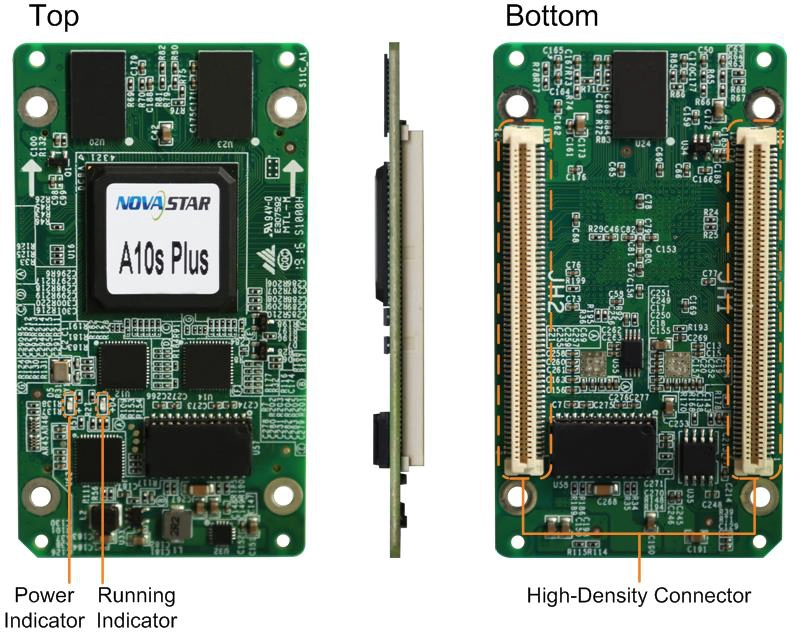
What is the NovaStar A10s Plus receiving card?
The NovaStar A10s Plus is an 80 mm receiving card that sits inside a compatible LED cabinet. The controller sends the finished image to the cabinet; the A10s Plus passes the assigned pixel data to its LED modules through the matching hub board. For most buyers today, it is a like-for-like spare for a wall already built around this card, rather than a general upgrade for any LED cabinet.
That distinction matters because search results often place it beside the newer A10s Plus-N. Both use high-density connectors and can be described with a 512 by 512 capacity figure, but the older A10s Plus has a different board length and input-voltage range. When a card fails, the label on the installed card, its hub board and the saved configuration give a safer answer than choosing the newer-looking name.
A10s Plus key features
A smoother image when the wall runs dim
On a fine-pitch wall, dark gradients can become stepped or blotchy long before the screen looks wrong at full brightness. The A10s Plus supports NovaStar’s Image Booster functions, including 22bit+ and Precise Grayscale, for a compatible module and software path. In practical terms, those tools give a matched cabinet more room to hold shadow detail and neutral dark tones.
Calibration for a repaired or uneven cabinet
Pixel-level brightness and chroma calibration, RGB gamma adjustment and dark- or bright-line correction address visible differences rather than a failed electrical connection. They can help a sound cabinet blend back into the wall after a module repair. They cannot make the wrong module scan, hub board or cabinet file work; those must be matched before calibration begins.
Information that helps locate one bad cabinet
Mapping can show a cabinet’s receiving-card number and Ethernet-port position, while voltage, temperature and Ethernet bit-error monitoring can help separate a cable or power problem from a card problem. A stored image can also keep a compatible cabinet from becoming a black rectangle while the normal signal path is being checked.
Backup only works in a cabinet built for it
The A10s Plus supports dual-card and loop-backup functions when the cabinet hub board, cabling and configuration were designed for them. A spare A10s Plus by itself does not create redundancy. For a critical display, confirm whether the original cabinet has the second card position and the required primary/backup signal path before ordering parts.
NovaStar A10s Plus specifications
Use these values to identify the exact card and assess a like-for-like spare. Physical fit still comes first, because a matching pixel figure does not prove that another card can seat on the same hub board.
| Maximum load | 512 × 512 pixels |
|---|---|
| Module data | Up to 32 parallel RGB groups or 64 serial groups; serial mode can expand to 128 groups |
| Input voltage | DC 3.3 V to 5.5 V; 5.0 V recommended |
| Rated current / power | 0.5 A / 2.5 W |
| Dimensions | 80.0 × 45.0 × 8.0 mm |
| Fitted hub-board spacing | 5.0 mm after the high-density connectors mate; a 5 mm copper pillar is recommended |
| Operating environment | −20°C to +70°C; 10% to 90% RH, non-condensing |
| Certifications | RoHS and EMC Class B |
A10s Plus 80 mm replacement card and cabinet fit
The A10s Plus board is 80.0 mm long. That is a purchase decision, not a cosmetic detail. A card can share the same width, connector style and many display features with another NovaStar model while still failing to seat on the installed hub board or reach the cabinet’s mounting support correctly.
Start with the card label and take a clear photo of both the A10s Plus and the hub board before removing anything. Then match the board length, high-density connector arrangement, 3.3–5.5 V rail, module driver IC, scan method, RGB data groups and cabinet resolution. If any one of those is unknown, pause before ordering. A 512 by 512 figure only describes one limit; it does not prove the signal path is compatible.
Before a working card is removed, use NovaLCT to read back its receiving-card parameters and calibration data. Save the cabinet’s .rcfgx or supported configuration file with the wall records. On a replacement card, test that saved configuration on one cabinet first, then check the image, mapping, temperature and Ethernet status before changing the rest of the display.
A10s Plus vs A10s Plus-N
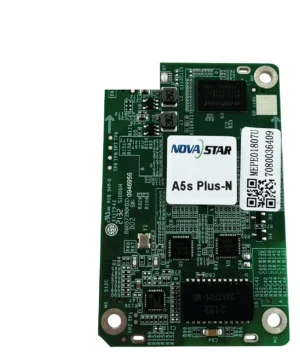
The two models share a name, but this comparison is mainly about protecting an existing cabinet. The A10s Plus-N is a 70 mm current-model card with a newer documented bit-depth capacity split. It may be right for a cabinet designed for it, but it is not a name-only replacement for an 80 mm A10s Plus wall.
| Check | A10s Plus | A10s Plus-N | Why it matters before ordering |
|---|---|---|---|
| Board length | 80.0 mm | 70.0 mm | The installed hub board and mounting support must fit the exact board. |
| Input voltage | DC 3.3 V to 5.5 V | DC 3.8 V to 5.5 V | An older cabinet can fall within the original card’s range but outside the Plus-N’s published range. |
| Published maximum load | 512 × 512 pixels | 512 × 512 at 8-bit; 512 × 384 at 10/12-bit with PWM driver ICs | Do not transfer a capacity rule from one card document to the other. |
| Best fit | A documented A10s Plus cabinet or spare lot | A cabinet designed and configured for A10s Plus-N | The cabinet package decides the card, not the family name. |
If the old card says A10s Plus, use a matching A10s Plus unless the cabinet maker has confirmed a complete conversion. A Plus-N conversion requires the hub board, power rail, module wiring and new configuration path to be approved together as one tested change.
A10s Plus datasheet, NovaLCT and replacement files
Start with the A10s Plus datasheet to confirm the old card’s physical and electrical limits. Then use NovaLCT to read back the working card’s parameters and preserve cabinet data before a swap. Keep those files with the card serial number and hub-board photos, because they describe this cabinet rather than a generic A-series setup.
No model-specific public firmware package is linked here. Do not install a Plus-N package because the names are similar. Instead, read the working card’s firmware details and save its configuration first; the exact PCB and module-chip information determines the safe replacement path.
NovaStar A10s Plus FAQ
What does an A10s Plus receiving card do?
It sits in a compatible LED cabinet, receives the image data mapped by the controller and sends the assigned pixel data to that cabinet’s LED modules through the matching hub board.
What is the A10s Plus maximum load?
NovaStar’s A10s Plus Specifications V1.0.5 lists a maximum loading capacity of 512 by 512 pixels. The cabinet still has to match the hub board, scan, module data groups and saved configuration.
Is A10s Plus the same card as A10s Plus-N?
No. The A10s Plus is 80.0 mm long and accepts DC 3.3 to 5.5 V. A10s Plus-N is 70.0 mm long and publishes a DC 3.8 to 5.5 V range. They are not automatic substitutions.
Can another 80 mm board replace an A10s Plus?
Not from dimensions alone. Match the high-density connector layout, hub board, power rail, module driver IC, scan, RGB data groups and configuration before fitting another receiving-card model.
Does A10s Plus support low latency?
It can reduce receiving-card-end latency to one frame when the LED modules use driver ICs with built-in RAM. Confirm the complete source, sender and module path before specifying it for a camera-facing screen.
Can A10s Plus rotate an LED image?
It supports rotation in 90-degree steps. Any-angle rotation needs the compatible MCTRL R5 controller and SmartLCT system, as well as a cabinet configuration designed for that workflow.
What must be saved before replacing an A10s Plus?
Use NovaLCT to read back the working card parameters and calibration data, then keep the cabinet RCFGX or supported configuration file with the wall records. Test those files on one replacement cabinet first.
Can I use A10s Plus-N firmware on an A10s Plus?
Do not do that. The models have different physical and electrical specifications, and no exact public A10s Plus firmware package is linked here without verification. Read the working card’s information and match the PCB and module chips first.
What should I send for an A10s Plus compatibility check?
Send the complete card label, clear photos of both sides of the card and hub board, module label or driver IC, cabinet resolution, supply voltage and saved configuration file. Those details let us assess a spare rather than guessing from a product-family name.
How should I request a larger A10s Plus spare lot?
Include the cabinet count, required spares, delivery date and the identification details above. We can quote a matched spare lot after the cabinet path is reviewed and discuss the payment terms available for the account.
What warranty is included with an A10s Plus card?
Cards supplied through our authorized US NovaStar channel include three years of serial-tracked manufacturer coverage. Keep the replacement card serial information with the cabinet service records.
Reviews
There are no reviews yet.