
What is the NovaStar TCC70A?
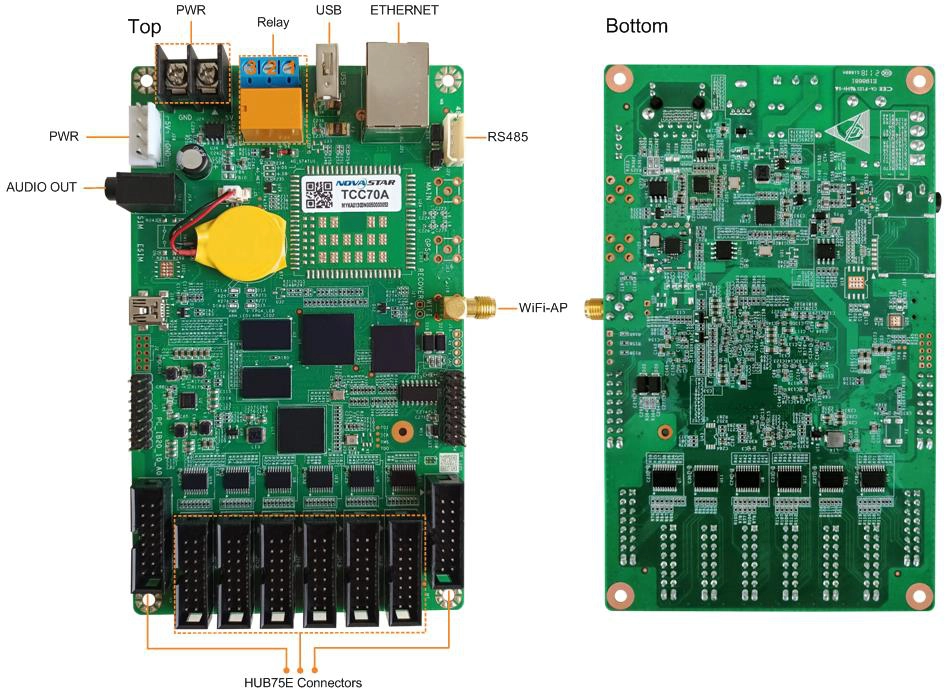
The NovaStar TCC70A is a control card that stores your content, plays it and drives your LED modules directly through eight HUB75E sockets. Nothing else sits in the chain: no player, and no separate board inside the cabinet. It is an earlier design that NovaStar has since built on, so most people reading this own one rather than are choosing one.
If one of your signs has gone dark and this is the board inside it, you are in the right place. We keep this model for exactly that job: getting your installed screen lit again rather than starting a new design around it.
For a new sign, the current cards in this family are the TCC160 and the TCC80, and the section further down sets out what changes when you move.
NovaStar TCC70A key features
The whole sign runs from one board
Your module ribbons land on the card’s eight sockets and your content sits in its own storage, so a working TCC70A sign has exactly one active part in it. That is why these installations tend to run for years without anyone touching them.
It handles up to sixteen groups of parallel red, green and blue data, and lights up to 512 by 384 pixels.
A relay that can switch the sign off overnight
A three-pin contact on the board opens and closes a circuit you provide, rated to 30 V DC at 3 A, on the schedule you set in software. Wire two of the pins for simple on and off, or all three when something has to be positively switched to the other state.
NovaStar advises against running mains through it and publishes the alternative: the relay pins drive a solid-state relay that has its own 3 V to 30 V supply, and that device carries the live wire.
NovaStar TCC70A specifications
Check the supply row and the loading row against the sign you are repairing; those two decide whether a like-for-like swap is possible.
| Pixels per card | 512 × 384 |
|---|---|
| Screen shape | Up to 1280 pixels wide, or up to 512 pixels high |
| Module connectors | 8x HUB75E; up to 16 groups of parallel RGB data |
| Processor and memory | Quad-core at 1.2 GHz, 1 GB RAM, Android |
| Internal storage | 8 GB, of which 4 GB is available for content |
| Video decoding | 1080p in hardware |
| Storage socket | 1x USB 2.0, for playback from a drive |
| Sensor port | 1x RS485, for a light sensor or another module |
| Switching | 3-pin relay contact, maximum DC 30 V and 3 A |
| Wireless | Built-in 2.4 GHz hotspot; network name is AP plus the last eight digits of the serial number |
| Power in | DC 4.5 V to 5.5 V; 10 W maximum draw |
| Size and weight | 150.0 mm × 99.9 mm × 18.0 mm; 106.9 g |
| Operating range | −20°C to +60°C, 0% to 80% RH, non-condensing |
| In the box | Card, omnidirectional antenna, quick start guide |
Figures come from NovaStar’s TCC70A Multimedia Player Specifications V1.0.1, dated 5 July 2021. NovaStar has not published a newer revision, so these are the current published figures for the model.
Replacing a TCC70A in a sign that already works
Save two things off the old card before you take it out, if it still talks to a computer: the module configuration and the content. The card holds your module wiring itself, so without that file a replacement starts from an unconfigured scan setup rather than from a working screen.
Check your supply next. This card wants 4.5 V to 5.5 V, and an ageing power supply that has drifted low is a common reason a sign goes black and the board takes the blame for it. Swap a suspect card into a known-good cabinet before you write it off.
Match the physical fit as well. Your board is 150.0 mm by 99.9 mm and 18.0 mm thick, and older signs are often built tightly around it, with the antenna cable routed to one particular spot. A spare kept on the shelf saves the second visit.
If the sign is one of several identical ones, this is the moment to decide whether you are repairing the estate or replacing it. Doing both at once, a few boards at a time, leaves you maintaining two setups side by side for years.
What a TCC70A will not be made to do
Three limits on this card cannot be lifted by software, and all three surface when you try to extend an older installation rather than replace it.
It will not keep step with a current player or card. NovaStar groups its players into platforms for synchronized playback and states plainly that models from different platforms must not be mixed, and this card belongs to the earliest group. A row of signs where half are new will not change picture together.
It will not play 4K. Decoding is 1080p, and the usable content space is 4 GB of the 8 GB fitted, so a long high-resolution rotation is not what this board is for.
Its wireless hotspot ships with a published default password, which on a sign installed years ago has often never been changed. Change it while you have the card in front of you; it costs a minute and closes an open door on your network.
Moving a TCC70A sign to a current card
Both current cards do the same job in the same way, so your module ribbons and your general approach carry over. What changes is capacity, decoding and how much cold the board tolerates.
| Card | TCC70A · TCC80 · TCC160 |
|---|---|
| Module sockets | 8 · 8 · 16 |
| Pixels per card | 512×384 · 160,000 · 260,000 |
| Video decoding | 1080p · 1080p · 4K |
| Usable storage | 4 GB · 32 GB · 32 GB |
| Supply | 4.5–5.5 V · 4.75–5.25 V · 5–12 V |
| Working temperature | −20°C to +60°C · −20°C to +70°C · −40°C to +80°C |
| Board size | 150.0 × 99.9 mm · 189.0 × 51.0 mm · 180.9 × 102.3 mm |
Move to the TCC80 if the sign is small and the housing is shallow — it keeps the eight module sockets and the 5 V supply, and gives you eight times the usable content space.
Move to the TCC160 if the screen is larger, if the content is video, or if the site gets colder than −20°C. Neither board is the same size as the one you are taking out, so check the housing before you order a batch.
TCC70A datasheet and software
ViPlex Express on a Windows PC is where your module configuration, playlist and relay schedule live, and it is still the current software for this card. The phone app works too, over the card’s own hotspot, which is often your quickest route into a sign with no network.
Ask NovaStar for the structural drawing if you are refitting a housing around this board. The dimension drawing in the datasheet carries a note that it is not meant for making molds or drilling patterns.
NovaStar TCC70A FAQ
Can I still buy a TCC70A?
Yes, and we keep it for repairs to installed signs rather than for new designs. Send the quantity and we will confirm availability before you commit.
What do I need to save before swapping the card?
The module configuration and the content, both from ViPlex Express while the old card still responds. The card holds your module wiring, so a replacement without that file starts from an unconfigured screen.
How many pixels does it drive?
Up to 512 by 384, with a maximum width of 1280 pixels or a maximum height of 512 pixels depending on the shape of your sign.
Can a TCC70A stay in step with a newer player?
No. NovaStar groups its players into platforms for synchronized playback and states that models from different platforms must not be mixed. This card is in the earliest group, so a mixed row of signs will not change picture together.
How much content will it hold?
4 GB, out of 8 GB fitted. Decoding is 1080p, so a long high-resolution rotation is beyond what this board was built for.
What voltage does it need?
Between 4.5 V and 5.5 V, drawing at most 10 W. An ageing supply that has drifted below that window is a common reason a card looks dead when it is not.
Should I change the wireless password?
Yes. The hotspot ships with a published default, and on a sign installed years ago it has usually never been changed. Do it while the card is in front of you.
Which current card replaces it?
The TCC80 for a small sign on the same 5 V supply, or the TCC160 for a larger screen, video content or a colder site. Neither is the same board size, so check the housing before ordering a batch.
What warranty covers a TCC70A?
Three years of serial-tracked manufacturer coverage, because these cards come through our authorized US NovaStar channel.
Can I get volume pricing or Net 30 terms?
Yes. Send the model and the count and we will quote. Purchase orders and Net 30 terms may be available for approved schools, government buyers, venues and established integrators.
How do I order a TCC70A?
This card is quoted rather than listed at a fixed price. Tell us the quantity and whether it is for a repair or a batch refit, and we will come back with availability. We ship from Florida.
Reviews
There are no reviews yet.