
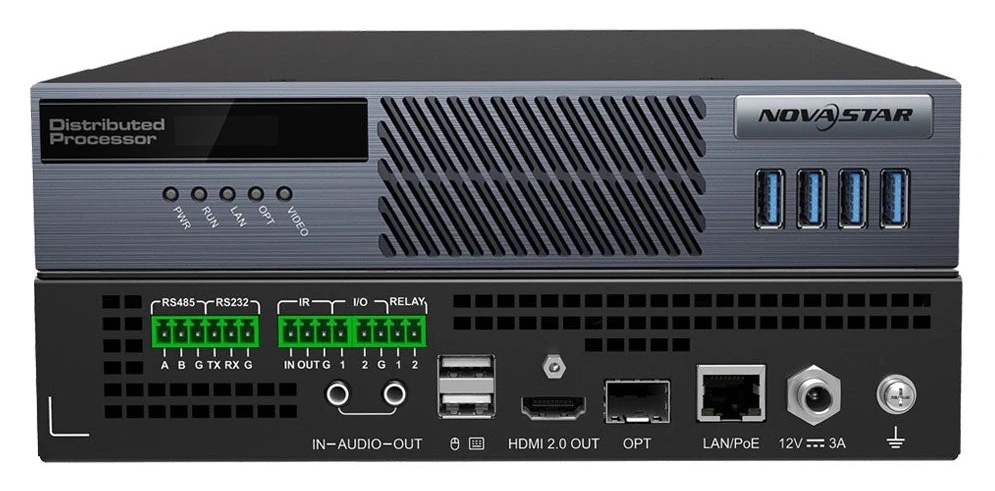
What is the NovaStar MG421?
If you need an operator to see a machine that is not on their desk, the NovaStar MG421 is the box that puts it on their monitor. It is an AV over IP decoder: it pulls a stream off your MG network and puts it out on one HDMI 2.0 connector at up to 4K×2K@60Hz.
You point it at whichever source you want. Every computer an MG420 has put on the network is available to it, and you switch between them from the operator screen rather than from a matrix. NovaStar rates the round trip at 60 ms or less, under four frames at 60 Hz. A camera on your wall still agrees with what you are hearing on the radio.
You get more than a picture on a monitor. Four USB 3.0 ports on the front take your keyboard, mouse and a drive of up to 256 GB. From that one desk you can drive the remote machine, push a source to a colleague, and copy files onto a PC you cannot reach. The HDMI output also feeds a sending card when the destination is an LED screen.
The reason to buy decoders rather than run long cables is that you decide later. A desk is not wired to a machine; it picks one off the network. Moving a source from a desk to the wall is a click, not a re-cable.
MG421 key features
One keyboard across every position
Without roaming, three monitors on a desk means three keyboards, and part of every shift goes on working out which one belongs to the machine showing the problem.
Plug one keyboard and mouse into any MG421 and your cursor crosses onto the monitors the other decoders drive. You lay those decoders out as rows and columns in the operator system, so the pointer moves the way your screens actually sit on the desk. Wireless sets work the same way.
Three ways to take over a source
When two of your operators want the same machine, you need a rule better than whoever clicks first.
The MG421 gives you three. Take a source in View and you can only watch it. Take it in Control and you and others can both work it. Take it in Monopolize and it is yours alone until you release it, because nobody else can see it or touch it.
So you escalate from a menu instead of over the radio.
Pushing a source to someone else
When you need a colleague two rooms away to look at what you are looking at, describing it costs more time than showing it.
Push the source to their position, or up onto the wall, and choose whether they can only watch it or can also drive it. They accept or refuse, and if nobody is at that desk the offer expires after 60 seconds, so a push never sits there pending.
A USB drive mounted onto a machine you cannot reach
Getting a file onto a server in a locked machine room normally costs you a walk, a badge and somebody to escort you.
Push a drive into the front of your MG421 and take over that source. The system then mounts that drive onto the remote computer as if you had plugged it into the back of it. You copy in either direction, on a drive of up to 256 GB.
How many MG421 decoders do you need?
One for every monitor and every screen feed, and the two do not share a box.
Every MG421 is set to one type or the other. A KVM node runs your operator system and cannot load screens. A screen node loads screens and gives your operator no menu. NovaStar also states that you cannot change the type of a unit while it is in use.
So count your positions rather than your rooms. An operator who needs two monitors plus a feed to the video wall is three MG421s: two KVM nodes and one screen node. Working that out on the drawing costs you nothing, and finding it on commissioning day costs you a delivery.
One monitor per decoder is the rule underneath that arithmetic. NovaStar wires one display to one decoder, so a nine-panel LCD wall is nine screen nodes and not one clever box.
One more job sits on top of the count. The web interface you configure the whole system from runs on a decoder you nominate as the primary management node. You can nominate a second one as the backup. If the first drops off the network, the backup promotes itself and you keep control.
Set the MG421 to KVM for a person with a keyboard, and to screen for a panel on a wall. Nominate two of them as primary and backup management nodes, and no separate server enters your drawing.
MG421 specifications
These figures tell you what one decoder will drive, how you power it, and what it needs from your network.
| Role | Decoder node in an MG-series AV-over-IP system, set as KVM or screen |
|---|---|
| Video output | 1× HDMI 2.0, HDCP 1.4 and 2.2, accompanied audio carried with the picture |
| Maximum output | 4K×2K@60Hz, with 3840×2160@60Hz as the default |
| Output EDID range | Width 800 to 8192 pixels, height 600 to 7680 pixels |
| Images per monitor | Four in the default 2×2 operator layout, from eight layouts |
| Front USB | 4× USB 3.0 for keyboard, mouse and a drive up to 256 GB |
| Rear USB | 2× USB 2.0 for keyboard and mouse |
| Audio | 1× 3.5 mm in, 1× 3.5 mm out, two channels to 48 kHz and 16-bit |
| Network | 1× Gigabit LAN with PoE 802.3AT, Cat5e or better |
| Optical | 1× 1G OPT port taking 1.25G modules, usable as the LAN backup |
| Control | 1× RS485 and 1× RS232, IR in and out, 2× I/O at 3.3 V, 1× relay rated 30 V DC and 3 A |
| Power | DC 12V 3A adapter, PoE 802.3AT, or both together |
| Maximum draw | 20 W |
| Dimensions | 211.7 mm × 226.0 mm × 45.0 mm |
| Weight | 1.9 kg net, 2.8 kg gross |
| Operating range | −10 °C to +60 °C, 0% to 80% RH non-condensing |
| Certifications | CCC, CE, FCC Class A |
One line in the output list is worth checking against your monitors. NovaStar publishes 1364×768 and 1364×1024 for a screen node but not for a KVM node. So if an operator monitor is fixed at either timing, an MG421 in KVM mode will not drive it.
Building an LCD video wall with MG421s
You describe the wall to the system as rows and columns of panels. For an LCD wall those are the real numbers: three across and three high is nine panels, so nine screen nodes go in the rack behind it.
One rule limits which decoders can share that wall. NovaStar only allows nodes running the same output resolution and frame rate into one video wall. So you cannot carry an older panel generation on the same canvas as a new one. Match your panels first, then buy the decoders.
Bezel compensation is what stops your wall looking like nine televisions. Turn it on and give it a horizontal and a vertical figure in pixels, each one the panel’s edge width plus half the gap to its neighbor. Your image then continues behind the frames instead of jumping across them, so a face crossing the join stays one face.
You can also lay static or scrolling text over the finished wall, positioned and sized in pixels. That covers the caption strip most control rooms end up asking for.
Order one MG421 per panel, confirm every panel runs the same output timing, and have your edge width and gap measurements ready for commissioning.
MG421 or MGT1000 for an LED wall?
Your MG421 reaches an LED screen through a sending card. NovaStar’s wiring runs an HDMI cable from the decoder into the sender, then Ethernet from the sender to the cabinets. So the sender you pair it with has to have an HDMI input. Confirm that before you plan on a card you already own.
The MGT1000 removes that box. It is a decoder with ten Gigabit LED ports of its own, driving up to 6.5 million pixels with no separate sender in the chain.
The arithmetic is simple. An MGT1000 costs $570 more than an MG421, so if the sending card your screen needs comes in under that, two boxes are cheaper. If it costs more, the MGT1000 is cheaper and you rack, power and configure one box instead of two.
| Where it ends | What to order | Boxes in the path |
|---|---|---|
| Operator monitor | MG421 set as a KVM node | One |
| LCD video wall | One MG421 per panel, set as screen nodes | One per panel |
| LED wall, small sender | MG421 as a screen node, plus a sending card with HDMI in | Two |
| LED wall, larger sender | MGT1000 | One |
One thing does not follow you down this path. NovaStar puts the brightness slider on screens loaded by the all-in-one decoder, so an LED wall you drive through a sending card is still adjusted on the sender.
MG421 datasheet and manual
Two official documents cover your MG421, and neither one is written for this box alone.
The specification, V2.1.0, holds the output connector table, the output resolution list and the physical figures. The user manual, V3.2.0, holds the part that matters more to you. That is the operator system, the matrix, the take-over and push behavior, and the video wall setup with its bezel-compensation rules.
If you are specifying an operator position, read the manual’s KVM chapter before you finalize the desk layout. Your monitor count, keyboard placement and node type all settle there rather than in the specification.
NovaStar MG421 FAQ
Can one MG421 drive two monitors?
No. It has one HDMI 2.0 output, and NovaStar wires one display to one decoder, so a two-screen position costs you two units. You do not need a second keyboard though, because your pointer crosses between them.
Can an MG421 be switched from KVM to screen use later?
Yes, but not while it is in service. You change the type on the device page. But NovaStar states that a unit currently in use cannot have its type changed, so plan the changeover for a window when that position is free.
How many sources can an operator see at once on one monitor?
Four, in the default 2×2 layout, chosen from eight layouts in the operator menu. Sources come from any encoder on the network, and each one is taken over separately.
Does the MG421 need an encoder to be useful?
Yes, for anything coming from a computer or a player, which is what the MG420 is for. Network cameras are the exception: they speak ONVIF or RTSP and join directly, so a wall showing only camera feeds needs decoders and no encoders at all.
Can a control panel change what the wall is showing?
Yes, through the open API rather than through the decoder’s own ports. You save a layout as a preset in the web interface and recall it by name. A third-party project gets a project ID and a secret key, with symmetric or asymmetric encryption, to make those calls. Presets can also run themselves on a loop or to a schedule with no control system involved.
Where does an MG421 physically go?
Under the desk, on a shelf, or bolted to its neighbour. The chassis is 211.7 mm wide and 45.0 mm tall. The accessories include foot pads for a desk, a hanging bracket, and a piece that fastens two units together into one block. NovaStar publishes the dimensions without a rack-mount drawing, so a rack elevation drawn around it should be confirmed rather than assumed.
What comes in the box?
The decoder, its power adapter and its mounting hardware. The packing list is shared with the MG420, with one line marked as not supplied here. That is the USB cable, which the encoder needs for KVM and the decoder does not.
- A 12 V power adapter and an HDMI cable
- Foot pads, a hanging bracket, a joining piece and the screws for them
- Phoenix terminals for the control block, with a plug and a small screwdriver
- Safety manual, assembly instructions and the certificate of approval
What warranty does the MG421 carry?
Three years of serial-tracked manufacturer coverage, supplied through our authorized US NovaStar channel.
Is there volume pricing on multiple decoders?
Yes, and a video wall is the case for it: nine panels means nine units on one line. Send the model and the count and we price it below the listed figure.
Can we buy on a purchase order or NET terms?
Yes, for approved buyers. Purchase orders and NET terms, Net 30 included, may be available to schools, government buyers, venues and established integrators.
How do I order the MG421?
Add it to the cart and submit the order request. Nothing is charged at that point: we confirm stock and quantity, apply volume pricing and send the invoice.
Reviews
There are no reviews yet.