
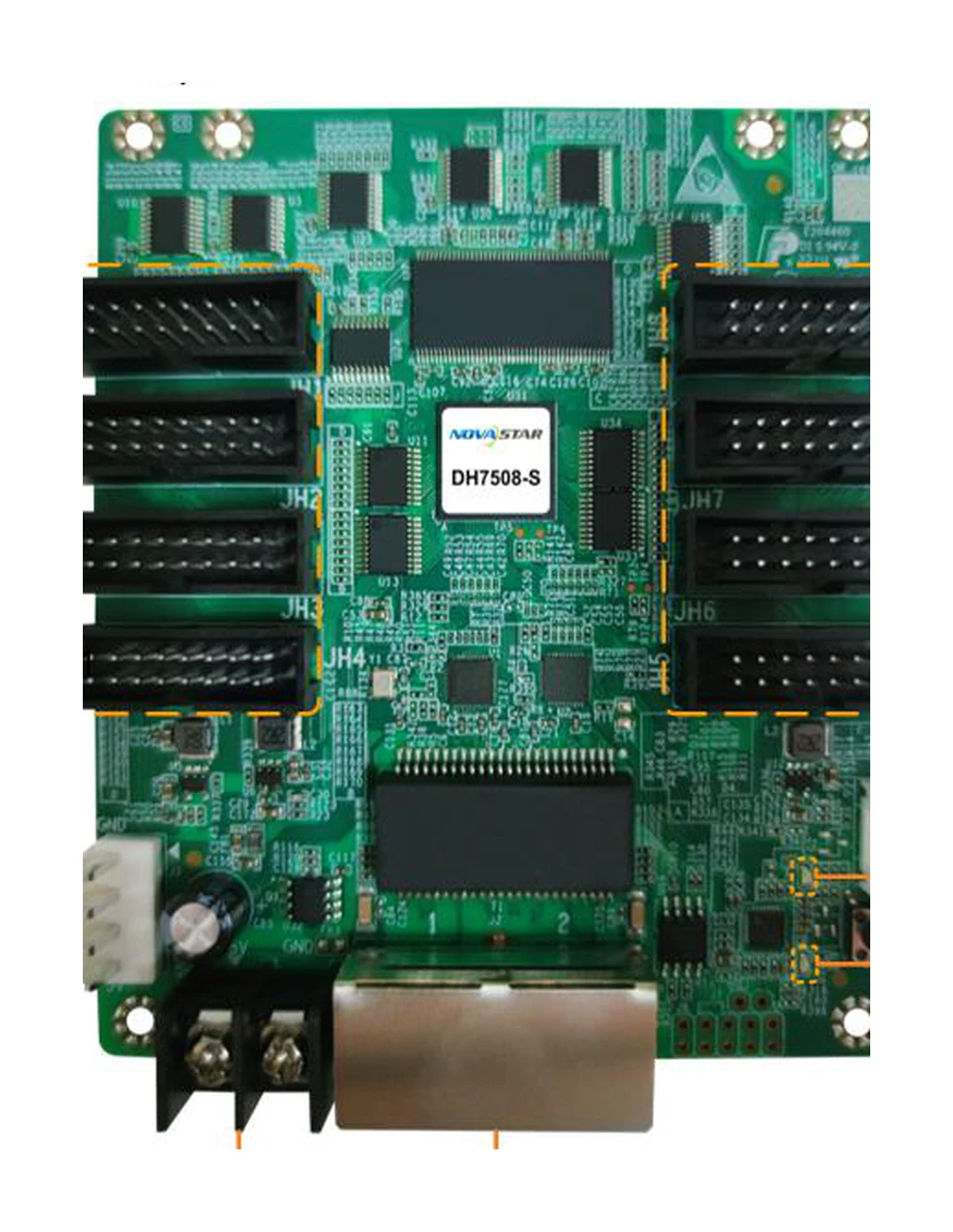
What is the NovaStar DH7508-S receiving card?
The NovaStar DH7508-S is a conventional LED receiving card for a cabinet that needs eight built-in HUB75E module connections. It receives the prepared screen data from a sending controller over Gigabit Ethernet, then delivers the assigned data to the LED modules inside that cabinet. It is a cabinet component, not a video processor and not a card that can be selected from pixel capacity alone.
The DH7508-S is most useful when the cabinet’s modules, ribbon paths and board layout were designed around its eight HUB75E outputs. Its large board makes the physical layout easy to recognize, but a spare still has to match the cabinet’s driver IC, module scan, saved configuration and current firmware family. A shortened listing that only says “DH7508” is not enough evidence that it is the same card.
DH7508-S key features
A more even picture across mixed cabinet batches
Brightness calibration, quick dark- or bright-line adjustment and multi-batch adjustment help correct visible differences at module seams and between cabinets from different production runs. On a long wall, that can mean a replacement cabinet is less likely to stand out as a brighter strip or a dark vertical line. These controls support a careful calibration process; they do not make unmatched LED modules identical.
Image controls when the rest of the system supports them
3D requires a controller that supports 3D. Individual RGB gamma adjustment also depends on a supporting controller and NovaLCT. Those conditions matter because the card can be part of a color or 3D display path without being the source device that creates those functions by itself.
A clearer way to isolate one cabinet fault
Mapping 1.1 can show the controller, Ethernet-port and receiving-card number on the LED wall. Temperature, voltage and Ethernet bit-error monitoring give a technician a way to narrow a fault before swapping modules or cables at random. The card can also read back its firmware program and configuration parameters to a computer, which is valuable before a working board is removed.
Backup paths for screens that cannot simply go dark
When the cabinet and controller are wired for it, loop backup can keep the image path running after one point in the Ethernet line fails. The card also stores two firmware-program copies from the factory. These are resilience features, not a reason to skip a backup of the cabinet’s known-good configuration before service.
NovaStar DH7508-S specifications
These figures identify the board and establish a first cabinet-fit check. The driver-IC-dependent capacity is explained in the next section.
| Role | LED receiving card with eight built-in module connections |
|---|---|
| Module connectors | 8 standard HUB75E connectors |
| Ethernet | 2 Gigabit Ethernet ports; either port can be input or output |
| Module data | Up to 16 groups of parallel RGB data |
| Load with PWM driver ICs | Up to 512 × 512 pixels at 60 Hz per card |
| Load with common driver ICs | Up to 512 × 384 pixels at 60 Hz per card |
| Input voltage / rated power | DC 3.8 V to 5.5 V; 0.5 A / 2.5 W |
| Dimensions | 95.5 × 109.0 × 19.4 mm |
| Operating environment | −20°C to +70°C; 10% to 90% RH, non-condensing |
DH7508-S 512 × 512 vs 512 × 384 load capacity
The DH7508-S has two published limits because the driver IC inside the LED module changes the card’s usable load. A cabinet using PWM driver ICs can reach 512 by 512 pixels at 60 Hz per card. With common driver ICs, the documented limit is 512 by 384. Do not use the larger number as a universal promise just because the cabinet has eight module connectors.
| Example cabinet map | PWM driver IC | Common driver IC | First decision |
|---|---|---|---|
| 512 × 512 | Within the documented one-card limit | Above the documented height limit | Confirm PWM modules, divide the cabinet, or use a different cabinet/card layout. |
| 512 × 384 | Within the documented one-card limit | Within the documented one-card limit | A valid one-card starting point for either listed IC type. |
| 256 × 512 | Within the documented one-card limit | Above the documented height limit | Check both width and height; total pixel count alone does not answer the question. |
These are limits for the receiving card as a whole, not eight separate 512 by 512 allowances. The completed cabinet also has to fit the module scan, ribbon routing and 16 parallel RGB data groups. Treat the module map as the last check before a new build or a card-count change.
DH7508-S eight HUB75E connections and cabinet wiring
The signal route is simple, but every part has to agree: the sending controller sends LED data over Ethernet to the DH7508-S; the card assigns that data to the cabinet; its eight HUB75E connectors carry the planned paths to the LED modules. The connectors are module connections, not eight independent Ethernet outputs and not eight separate capacity ratings.
Before ordering a replacement, open one working cabinet and record the board marking, the positions of the eight ribbons, the two Ethernet connections, module model and any hub or adapter board used in the cabinet. HUB75E tells you the connector family, but the connector shape alone does not prove that the scan, data order, cable orientation and saved cabinet configuration are a match.
If a cabinet is expanded, trace the cascade path as well. Each DH7508-S Ethernet port can work as input or output, so a loop-backup wiring plan can look different from a simple daisy chain. Keep the original port order and prove one cabinet before copying a configuration across the rest of the wall.
DH7508-S replacement card, configuration and firmware check
A replacement card should start with the working cabinet, not a download search. Before removing a card that still displays correctly, read back and save its configuration parameters and firmware program to a local computer. The configuration describes how this cabinet’s modules are scanned and mapped. The firmware is the program on the receiving card. One file cannot replace the other.
NovaStar currently lists a V5.0.2.0 firmware package for the DH7516-S, DH7512-S and DH7508-S family. That does not mean every working DH7508-S should be updated. Match the exact card marking, PCB revision, driver IC and release information first. If the cabinet already works, retain its known-good program and configuration so there is a safe recovery point.
After an exact spare is installed, apply the saved configuration to one cabinet, check the module map and image, then inspect temperature, voltage and Ethernet status. Only when that cabinet matches the rest of the wall should the same process be repeated elsewhere. This is slower than guessing from the connector count, but it is much cheaper than rebuilding a misconfigured screen during an event or installation.
DH7508-S datasheet, firmware and NovaLCT resources
Use the datasheet to confirm the board, capacity and connectors. Use NovaLCT for compatible configuration work, and use the official DH-family firmware route only after the existing cabinet files have been saved.
NovaStar DH7508-S FAQ
What makes DH7508-S different from a small receiving card?
DH7508-S has eight built-in HUB75E module connectors and a large board format for the cabinet’s module paths. Its identity is tied to that physical cabinet design, not only to its pixel capacity.
Is 512 by 512 the capacity of every DH7508-S cabinet?
No. That is the documented per-card limit at 60 Hz for PWM driver ICs. With common driver ICs, the published limit is 512 by 384. Confirm the module driver IC before using the larger figure.
Does each of the eight HUB75E connectors have its own 512 by 512 limit?
No. The 512 by 512 or 512 by 384 figure applies to the receiving card as a whole. The eight connectors divide the planned module data inside that overall card limit.
Can DH7508-S be used with any HUB75E LED module?
Not automatically. Check the module scan, data order, ribbon orientation, driver IC, cabinet wiring and saved configuration. A matching connector family alone is not a complete compatibility check.
Can DH7508-S create 3D by itself?
No. It supports 3D output only with a controller that supports 3D. The complete source, controller and display setup still determines whether a 3D installation works.
Does the current DH7508-S support a stored image after signal loss?
No. NovaStar’s current V1.2.2 specification does not list a stored-image function; its change history says that function was removed in V1.1.0. Plan the source and signal path accordingly instead of expecting the card to hold a fallback image.
What should I save before replacing a DH7508-S?
Read back and save the working card’s configuration parameters and firmware program, then photograph the card marking, module ribbons, Ethernet ports and cabinet model. The configuration and firmware serve different purposes, and both help recover the original cabinet state.
Should I install the newest DH7508-S firmware immediately?
No. NovaStar lists V5.0.2.0 as a family package for DH7516-S, DH7512-S and DH7508-S. Match the exact card revision and cabinet hardware first, and keep a known-good backup before any update.
Can DH7508-S support an Ethernet loop backup?
Yes, when the receiving card and controller are wired with primary and backup lines as a loop. Verify the planned port order and test the failover on one cabinet before relying on it for a full wall.
What should I provide for a DH7508-S spare-card quote?
Send the exact card marking, cabinet and module model, photos of the board and eight ribbon positions, controller model, required quantity and saved-file status. That is enough to verify whether an exact DH7508-S spare is the right choice before pricing.
Can I request DH7508-S volume pricing or Net 30 terms?
Yes. Send the cabinet count and spare quantity for volume pricing or eligible Net 30 terms. Include the cabinet model when the order is a replacement.
How is DH7508-S warranty coverage handled?
Cards supplied through our authorized US NovaStar channel include three years of serial-tracked manufacturer coverage.
Reviews
There are no reviews yet.