
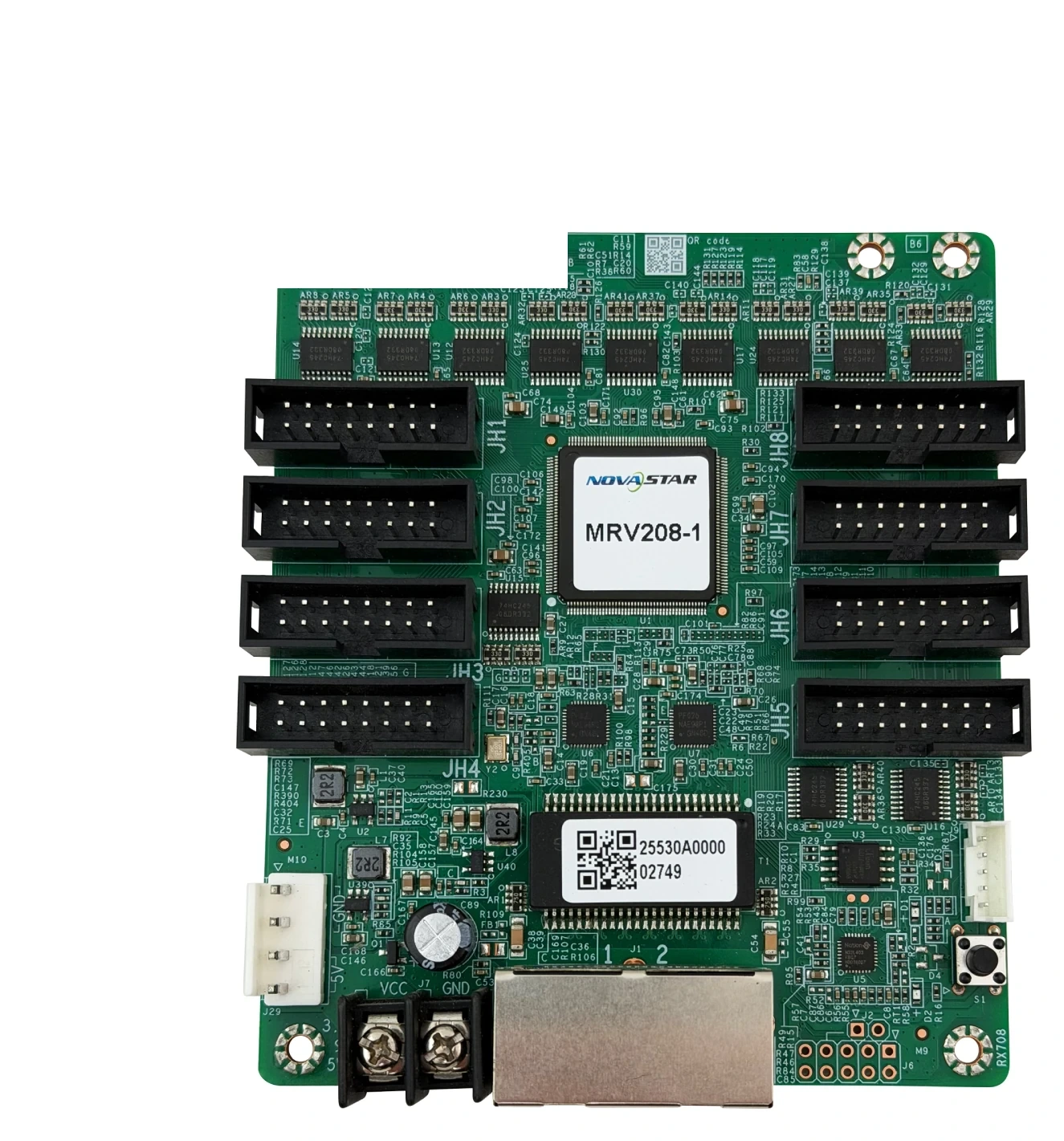
What is the NovaStar MRV208-1 receiving card?
The NovaStar MRV208-1 is a receiving card fitted inside an LED cabinet. It receives the controller’s data and sends it to the cabinet’s LED modules through eight HUB75E outputs.
It is most often a repair or exact-spare purchase for an existing cabinet. With PWM driver ICs, its documented full-card load is 256×256 at 60 Hz. The old card label, HUB75E layout, module wiring and saved configuration still have to match before a replacement is ordered.
MRV208-1 key features
Eight direct module outputs
The MRV208-1 has eight HUB75E connectors for the module runs inside the cabinet. This is useful only when the replacement board and the cabinet’s module ribbons match; the connector count is not a reason to swap it into a different cabinet family.
Cleaner cabinet seams
Pixel-level brightness and chroma calibration, plus dark- or bright-line adjustment, help a compatible cabinet look more even after modules or cards are serviced. Keep the original calibration data; a replacement card does not recreate it by itself.
A named cabinet when service starts
With NovaLCT 5.2.0 or later, Mapping can show the receiving-card number and Ethernet position. That saves cable tracing when a wall has one problem cabinet in the middle of an installed screen.
More time to recover from a cable fault
A stored image can be shown at startup or when the source path is absent, and loop backup can keep the image running after a line fault in a supported loop. These are recovery tools, not a substitute for matching the card and cabinet correctly.
NovaStar MRV208-1 specifications
Use these values for an initial fit check, then confirm the cabinet’s driver IC, scan type, connector and saved configuration before ordering.
| Product type | LED receiving card |
|---|---|
| Documented load | 256×256@60Hz with PWM driver ICs |
| Module data | up to 16 groups of parallel RGB |
| Input voltage | DC 3.8 V to 5.5 V |
| Rated power | 2.5 W |
| Dimensions | 95.5 mm × 109.0 mm × 19.4 mm |
Will the MRV208-1 fit your LED cabinet?
A safe MRV208-1 replacement matches the model printed on the old card, the cabinet interface, voltage and the saved configuration. Equal dimensions or equal headline capacity do not prove that another receiving card will work.
- Card label: confirm the complete MRV208-1 model and suffix.
- Cabinet interface: match the hub board, connectors, pinout and module data groups.
- Working files: save the receiving-card program and RCFGX cabinet file before removal.
- Power: verify the cabinet voltage and available power before the new card is connected.
Think of this as a cabinet-fit check, not a shopping filter. A card that appears similar can power up and still leave a cabinet black, mirrored or in the wrong pixel order when the module route does not match. A photo of the old card and the HUB75E ribbons is normally more useful than a maximum-pixel number.
MRV208-1 configuration and cabinet files
For an existing cabinet, the fastest setup starts before the old MRV208-1 is removed. Read the working card in NovaLCT and save its receiving-card program plus its RCFGX cabinet file.
The cabinet file carries scan, wiring and pixel-map data for that specific module layout. A file from a screen that merely looks similar can send data in the wrong order, so keep the original file with the cabinet serial or location.
MRV208-1 load information before ordering
For PWM driver ICs, the MRV208-1 is documented to load up to 256×256 at 60 Hz across the whole card. That is the full-card figure, not a number for each of the eight module outputs.
Start with the pixel count of the complete cabinet, then check that the module wiring and its 16 parallel RGB data groups fit the existing card path. If the cabinet is larger, needs a different driver type, or uses a different data route, do not force the MRV208-1 into the design; choose the card the cabinet maker specifies.
MRV208-1 firmware and replacement checks
Firmware searches are common for the MRV208-1, but the safest file is the one that matches the card PCB, driver ICs and decoding chips. Save the working version before changing anything.
If the cabinet already displays correctly, update only to solve a documented problem or meet a stated compatibility requirement. A newer package can support a different hardware combination and is not automatically an upgrade for this screen.
MRV208-1 replacement and model comparison
Compare the change that affects the cabinet, not the longest feature list. For an existing wall, an exact spare is usually safer than a different model with a larger maximum load.
| Model | Decision point |
|---|---|
| MRV208-1 | 256×256@60Hz with PWM driver ICs; current page model |
| MRV208-N | up to 512×512@60Hz at 8-bit with PWM driver ICs; lower at 10-bit or with common driver ICs |
| MRV328 | 256×256@60Hz (PWM driver ICs) |
Before changing models, ask the cabinet maker to confirm the connector, pinout, module data groups, firmware and configuration-file path together.
MRV208-1 datasheet, firmware and NovaLCT
Start with the MRV208-1 datasheet to check the documented load, dimensions and operating limits. Before replacing a working card, use NovaLCT to read and save both the receiving-card program and the cabinet configuration file.
The firmware tells the card how to work with the module’s driver and decoding ICs. The RCFGX file stores the cabinet’s scan, wiring and pixel map. One cannot replace the other, and a newer firmware package is not automatically better for a screen that already works.
NovaStar MRV208-1 FAQ
What does the MRV208-1 do?
The MRV208-1 sits inside an LED cabinet. It receives screen data from the controller or the previous cabinet and sends the correct pixel data to the LED modules connected to that cabinet.
What is the MRV208-1 load capacity?
With PWM driver ICs, the documented capacity is 256×256 at 60 Hz for the whole receiving card. Confirm the cabinet’s complete module map and data layout before treating that figure as a replacement decision.
Can the MRV208-1 replace a different receiving card?
Do not assume so. Match the exact model, connector or HUB layout, pinout, voltage, firmware and saved cabinet file before changing card families.
Can I use an RCFGX file from another MRV208-1 screen?
Only if the module, driver IC, scan, wiring and cabinet layout are identical. Read the working cabinet whenever possible.
Should I update MRV208-1 firmware before a repair?
Save the working program first. Update only when the package matches the hardware and addresses a specific need.
What should I save before replacing a MRV208-1?
Read the working card in NovaLCT and save both its receiving-card program and its RCFGX cabinet file. They serve different purposes, so keep both.
Can I request quantity pricing for MRV208-1 spares?
Yes. Send the number of cabinets, the old-card label, a clear hub-board photo and the cabinet file if available. We can check the replacement path before quoting the required quantity.
Reviews
There are no reviews yet.