
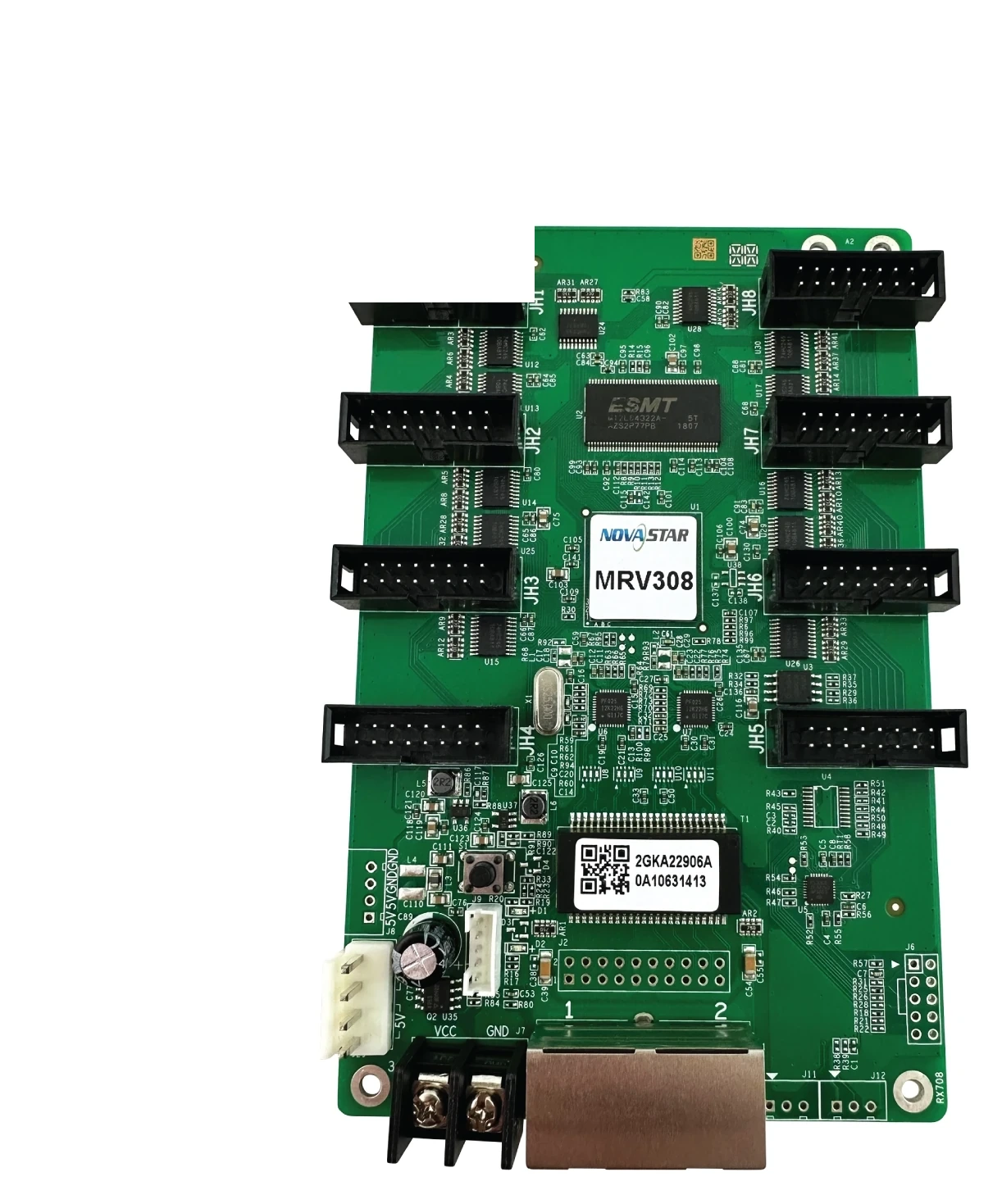
What is the NovaStar MRV308 receiving card?
The NovaStar MRV308 is an LED receiving card for cabinets that connect their module ribbons directly to the card. It receives the prepared screen signal through Gigabit Ethernet and sends the mapped data to the modules through eight built-in standard HUB75 connectors. For the right cabinet, that removes the separate hub board between the receiving card and the modules.
This is not a reason to treat MRV308 as a universal replacement. The eight sockets, board size, power connection and saved module configuration need to match the cabinet already in service. A cabinet designed around a different hub board or different receiving-card connector layout may need its original card instead, even if its total pixel count looks similar.
NovaStar specifies a maximum load of 256 × 256 pixels for one MRV308. Think of that as the card-wide ceiling: it helps when checking the total module layout, but the module scan pattern, driver IC, data type and physical ribbon layout still decide what can be sent to each connector.
MRV308 key features
Eight integrated HUB75 connectors
All eight standard outputs are on the board. In a compatible cabinet, the module ribbons can connect straight to the MRV308 instead of passing through a separate hub board. This is useful for a compact, repeatable cabinet layout, but it also makes the connector positions and module ribbons part of the replacement check.
A direct way to plan a 256 × 256 cabinet load
The 256 × 256 limit describes the total card load, not eight independent 256 × 256 channels. Add up the modules assigned to the card, then compare that total with the documented ceiling. If a cabinet has an unusual scan design or one ribbon is used differently, keep the existing configuration rather than guessing from the connector count.
Tools that help a display recover cleanly
The MRV308 supports brightness and chroma calibration, a pre-stored image, and status checks for temperature, voltage, Ethernet communication and video source. These features help a technician see whether a cabinet has lost signal, power or configuration. They do not override an incorrect module map or turn a different card into a compatible spare.
NovaStar MRV308 specifications
Use these official values to identify the MRV308 and assess cabinet fit. The current cabinet file and module wiring remain the final check before a replacement or a new cabinet layout is approved.
| Check | MRV308 | Buying or installation meaning |
|---|---|---|
| Maximum card load | 256 × 256 pixels | Total planned module pixels must stay within this card-wide limit. |
| Module outputs | 8 standard HUB75 connectors | Suitable for a cabinet where module ribbons land directly on the receiving card. |
| Network input | Gigabit Ethernet | Connects to the controller or the preceding cabinet in the LED signal chain. |
| Supply and power | DC 3.3–5.0 V; 0.5 A; 2.5 W | Confirm the cabinet’s power path before a replacement is connected. |
| Board size | 145.6 × 95.5 × 16.0 mm | Check mounting posts, enclosure depth and cable bend space. |
MRV308 8 HUB75 ports and cabinet wiring
MRV308 is a good fit when the cabinet has eight standard HUB75 module-ribbon connections arranged to reach the card directly. That can simplify the internal path: controller signal reaches the receiving card, and the receiving card distributes the configured data to the modules. It is a cabinet-level design choice, not merely a port-count advantage.
Before ordering a replacement, compare the board with the cabinet while it is still working. Count the module ribbons, photograph the connector positions, note the orientation of the card and make sure the power plug and Ethernet socket clear the cabinet frame. Do not move ribbons by trial and error after the old card is removed; a ribbon in the wrong position can look like a scan or configuration problem.
If the cabinet uses a separate hub board, an MRV308 may not be the appropriate part even if the screen has eight module ribbons. Choose the exact original receiver arrangement unless the cabinet maker has confirmed a complete, tested conversion.
Can one MRV308 drive your LED modules?
Start with the total pixels assigned to the card. For example, sixteen 64 × 64 modules make a 256 × 256 canvas and reach the published ceiling. A smaller total can still be a poor fit if the modules, driver IC, scan mode or ribbon order differ from the saved cabinet design. Capacity tells you whether the design begins to fit; it does not describe the whole configuration.
| Example module layout | Total pixels | Initial MRV308 check |
|---|---|---|
| 4 × 4 modules at 64 × 64 | 256 × 256 | At the documented total ceiling; retain the tested scan and configuration. |
| 4 × 2 modules at 64 × 64 | 256 × 128 | Within total load; confirm which ribbons and module order the cabinet uses. |
| 2 × 2 modules at 128 × 128 | 256 × 256 | Same total load, but still needs the correct module settings and ribbon map. |
For an existing wall, the best evidence is a working MRV308 configuration readback. For a new cabinet, confirm the module maker’s scan and connector plan before treating these examples as a final design.
MRV308 applications
Direct-module cabinets
Cabinets whose eight standard module ribbons terminate at the receiving card rather than a separate hub board.
256 × 256 module canvases
Planned module arrangements that stay within the card’s documented total load and use a tested module map.
Like-for-like service spares
An existing MRV308 cabinet when the board label, eight-ribbon layout, power connection and saved configuration agree.
Serviceable fixed displays
Installations where status checks and a saved configuration help isolate a card, cable, power or module issue.
MRV308 setup and configuration restore
Before removing a working card, use NovaLCT to read and save the receiver-card configuration. Keep the file with photos of the card, module ribbons and cabinet location. That record carries the scan, module wiring and pixel map that let a replacement drive the existing cabinet correctly.
After confirming the MRV308 label, eight-HUB75 layout and power connection, install one card first. Restore the saved configuration, test the cabinet with a known source, and inspect the image before making a wider change. If it is blank, scrambled or a different colour, check the module ribbons, network path and power before changing firmware or replacing more hardware.
Firmware is separate from the cabinet file. The official MRV308 V4.5.4.0 package is available for cases that require that exact update, but a screen that already works should keep its known-good firmware unless the installed PCB, module hardware and reason for the update are clear.
MRV308 datasheet, firmware and NovaLCT
Use the official product description to confirm the card and cabinet layout first. The links below are real model-specific or official resources; save the working configuration before any firmware or hardware change.
MRV308 firmware V4.5.4.0Use only after confirming the installed card and a specific update need.
NovaLCT downloadRead, save and restore the MRV308 receiving-card configuration.
NovaStar download centerCheck current official resources for this legacy receiver card.
NovaStar MRV308 FAQ
What is MRV308 used for?
It is a receiving card for an LED cabinet whose modules connect through its eight integrated standard HUB75 connectors.
Does MRV308 need a separate hub board?
Not in the intended direct-module layout: the card integrates eight standard HUB75 connectors. A cabinet built around another hub board still needs its own proven interface arrangement.
What is the MRV308 maximum resolution?
NovaStar lists a maximum card load of 256 by 256 pixels. The module scan, wiring and saved configuration must also be correct.
Can an MRV308 replace any eight-port card?
No. Match the printed model, board dimensions, eight-ribbon connection layout, power connection, modules and saved configuration.
What should I save before replacing an MRV308?
Save the working receiver-card configuration in NovaLCT and take photos of the card, module ribbons and cabinet connection points.
Why can a replacement card communicate but show a wrong image?
The receiver-card configuration may not match the module scan, wiring or pixel map. Restore the saved file and test one cabinet before changing more parts.
Is MRV308 firmware V4.5.4.0 the right update for every MRV308?
No. It is the exact official package listed for MRV308, but it should be used only when the installed hardware and reason for updating are confirmed.
Can you check whether MRV308 fits my cabinet?
Yes. Send the board label, photos of the eight module ribbons and the cabinet connection layout through our compatibility request form.
Reviews
There are no reviews yet.