
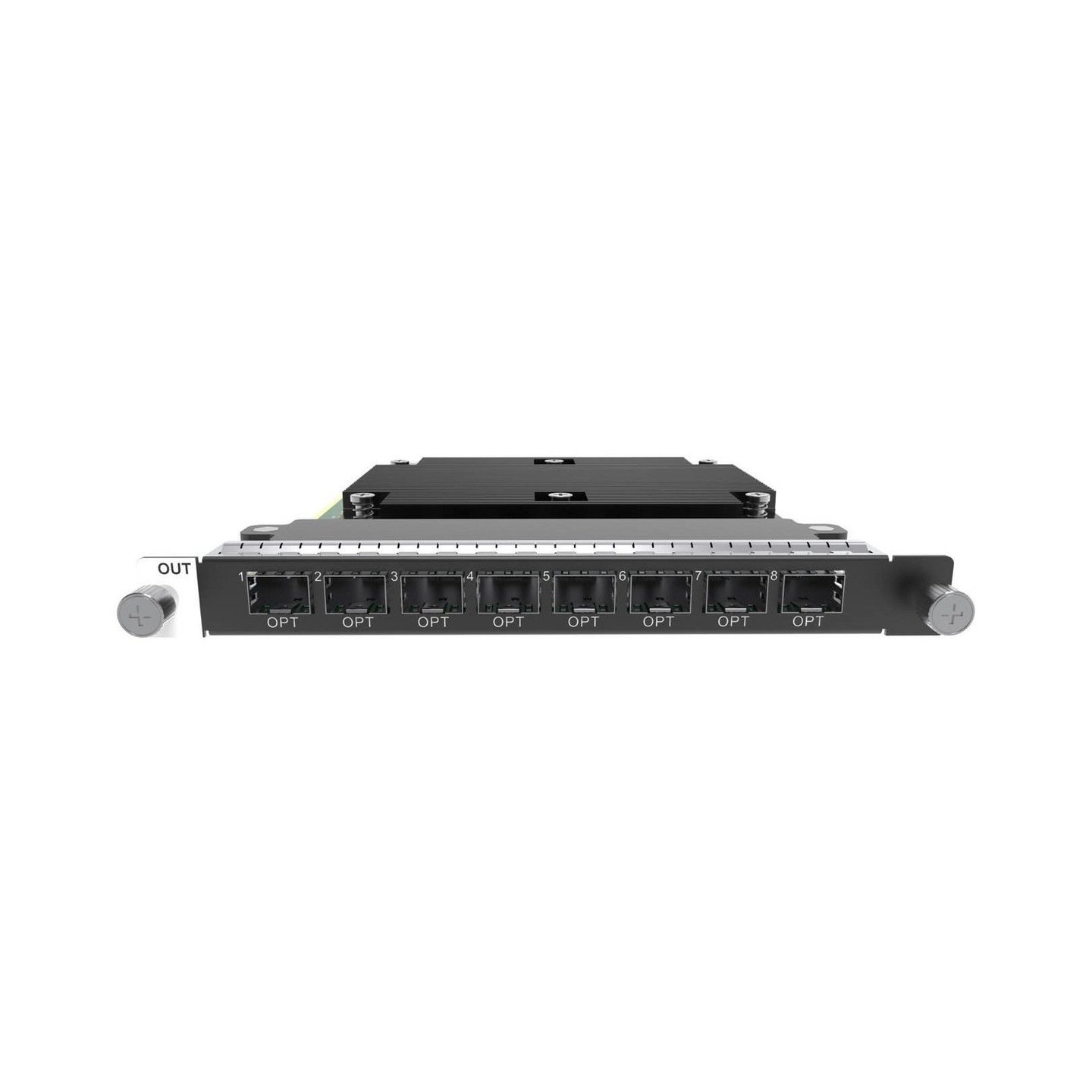
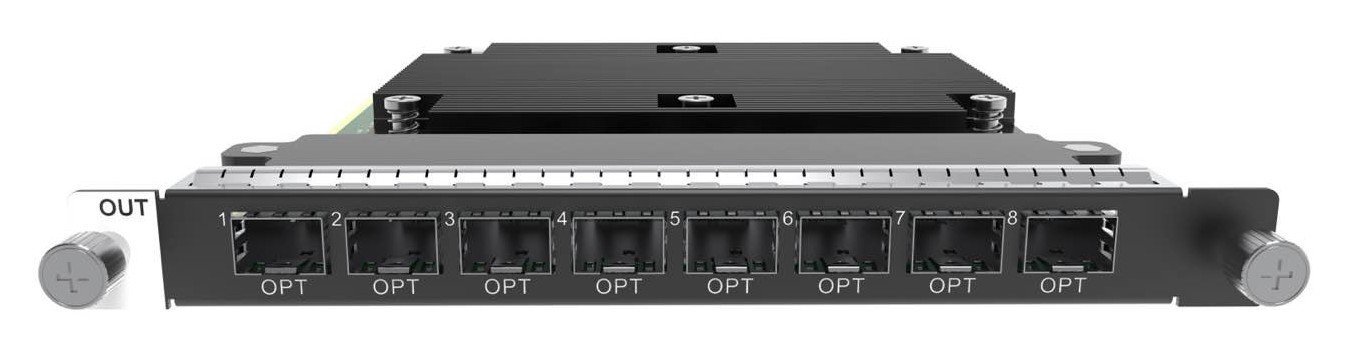
What is NovaStar H_4xFiber sending card (Enhanced)?
The NovaStar™ H Series 4x Fiber Sending Card (Enhanced) is an LED output card for a compatible H Series chassis. The chassis builds the picture for the LED wall; this card carries that completed picture toward the LED cabinets over four planned primary fiber routes.
It has eight OPT connectors, but only OPT 1–4 are primary LED routes. OPT 5–8 are partners for those routes: each one can copy or back up its matching primary path. Choose this card when the cabinet design needs that four-primary-plus-four-partner arrangement, a higher 26-million-pixel card limit, or its documented fade-transition support. It is not the right choice when the plan needs eight unrelated primary fiber outputs.
Request H_4xFiber Sending Card (Enhanced) bulk pricing →
For confirmed multi-card or project quantities. Direct checkout is available when the chassis slot, four primary routes, partner-path purpose and cabinet configuration are already specified.
NovaStar H_4xFiber sending card (Enhanced) key features: what makes it different?
- Keep a large LED wall on one matching fiber-card design: one card supports up to 26 million pixels. That is the card total, not a 26-million-pixel allowance for every OPT connector.
- Give four primary cabinet routes a deliberate partner: OPT 5 copies or backs up OPT 1, OPT 6 partners OPT 2, and so on. The extra connectors have a specific purpose in the route drawing; they are not bonus independent outputs.
- Support a planned change between display states: the screen loaded by this card supports fade transitions as well as output up to 144 Hz. This is useful when an operator needs an LED canvas to move cleanly between rehearsed looks, presentations or display states.
- Allow more flexible cabinet mapping when the receiving-card design qualifies: NovaStar documents free topology for specific receiving-card designs. It can help a non-rectangular cabinet layout, but it must be confirmed with the actual receiving cards before the purchase is based on it.
- Begin with optics on the primary side: four 10G SFP+ LR modules are installed in OPT 1–4. The complete cabinet path still needs compatible fiber, cabinet-side conversion and a defined copy or backup plan.
NovaStar H_4xFiber sending card (Enhanced) specifications
These are limits for one output card. The completed LED system also depends on a compatible H Series chassis, the installed receiving cards, the selected bit depth and the physical fiber route.
What the eight OPT ports mean for your LED cabinet routes
The card is easy to overbuy if the connectors are read as eight primary outputs. Its real value is four primary routes with one matched partner for each. Decide whether the partner is intended to repeat the picture or to form the planned backup path before the fiber is installed.
How NovaStar H_4xFiber sending card (Enhanced) reaches LED cabinets
- Build the finished LED layout in the H Series chassis: installed input cards bring in the required video, and the chassis places it on the target LED canvas.
- Assign the four primary cabinet routes: define what leaves OPT 1–4, check the total card capacity and confirm whether 8-bit or 10-bit planning changes the route load.
- Give each primary route the right partner: configure OPT 5–8 as the planned copy or backup paths. They follow the matching primary route rather than carrying new content.
- Complete and map the cabinet side: match the optical module, fiber and fiber converter route; then use NovaLCT to apply the selected bit depth, receiving-card configuration and physical cabinet order.
H_4xFiber sending card (Enhanced) vs standard H_4xFiber sending card
The choice is not “eight ports versus four.” Both cards provide four primary fiber routes. The difference is what the remaining connectors can do, how much one card can load, and whether the screen requires the Enhanced card’s documented fade-transition behavior.
See the standard H_4x Fiber Output Card when four independent primary fiber paths are the real requirement. Do not load one LED screen with the standard and Enhanced fiber cards together.
NovaStar H_4xFiber sending card (Enhanced) applications
Each example begins with a real reason to use four primary fiber routes and their matched partners. The H Series chassis still creates the visible layout; this card takes that finished layout to the cabinet side.
Central rack to remote LED zones
A venue can keep its H Series chassis in the equipment room while four planned fiber routes carry the finished LED layout toward cabinet-side equipment in separate display zones.
A deliberately mirrored display route
Copy mode suits a system where the same planned LED route must reach a second destination. The partner port repeats its assigned primary path instead of becoming a different display feed.
A planned alternate cabinet route
Backup mode is for an installation that has already included an alternate physical route for each primary fiber path. It is not a substitute for designing that second route.
Presentation screens that change between states
For a planned presentation or experience center display, the Enhanced card’s fade-transition support can make the change between configured screen states feel more deliberate.
NovaStar H_4xFiber sending card (Enhanced) manual, datasheet and H Series firmware
The first document includes the official Enhanced-card section. The manual, firmware and release notes are verified H Series family resources, not files that apply only to this one card.
NovaStar H_4xFiber Sending Card (Enhanced) specifications (PDF)
Official H20 document that includes the Enhanced card’s OPT mapping, capacity, 8-/10-bit planning and optical-module details.
NovaStar H Series user manual (PDF, V1.15.0)
Verified family guide for output-card configuration and NovaLCT cabinet mapping.
NovaStar H Series firmware (ZIP, V2.2.0.0)
Verified family firmware package; it is not Enhanced-card-only firmware.
NovaStar H Series release notes (TXT, V2.2.0.0)
Version changes and update notes for the same family firmware package.
NovaStar H_4xFiber sending card (Enhanced) FAQs
Is H_4xFiber Sending Card (Enhanced) a video wall splicer?
No. It is an H Series fiber LED output card. The compatible H Series chassis creates the screen layout; this card carries the finished layout toward cabinet-side equipment.
Are all eight OPT ports independent LED outputs?
No. OPT 1–4 are the four primary routes. OPT 5–8 respectively copy or back up OPT 1–4, so they should be ordered for a documented partner route, not as four additional content feeds.
What does the 26-million-pixel figure mean?
It is the maximum for one Enhanced card. It is not a per-port figure and it does not mean eight ports can each carry 26 million pixels. The per-route load also changes with the selected bit depth and receiving-card conditions.
Does the card support Independent mode?
No. The Enhanced model supports Copy and Backup modes. Choose the standard H_4xFiber card when the real requirement is four independent primary fiber routes.
Can I use standard and Enhanced H_4xFiber cards on one LED screen?
No. NovaStar does not allow the Enhanced card to load one LED screen together with the standard H_4xFiber card, H_20xRJ45 or H_16xRJ45+2xFiber cards.
Are optical modules included?
NovaStar includes four 10G SFP+ LR modules in OPT 1–4. Confirm the actual fiber type, route and cabinet-side conversion before relying on the included modules.
Does free topology work with every receiving card?
No. NovaStar specifies that a free-topology design needs specific receiving cards. Confirm the actual receiving-card design before making it part of the LED-wall plan.
Which NovaLCT version is required?
NovaStar specifies NovaLCT V5.8.0 or later for screen configuration with this card. Use it to set bit depth and to send the receiving-card and cabinet map that matches the installed route.
Reviews
There are no reviews yet.